Cloud Etiquette 101

Horrible house guests, we’ve all had them. Whether it be that annoying family member that over stays their welcome, or that old college buddy that leaves beer cans and potato chip crumbles all over your couch, we have all experienced those discourteous visits. If you thought that was bad etiquette, you’ve yet to see the worst…

Imagine coming home and finding that your current work has gone missing, your valuable data has been completely disorganized and all your important files have been put in the trash, what would you do? I’m not referring to your terrestrial home, I am talking about the virtual home most businesses today share – the cloud.

Cloud computing has its own essential and unwritten code of ethics. As a cloud user, you must be courteous of others you share the cloud with, no one appreciates an ill-mannered cloud partner. For those reasons we have put together a few etiquette tips to help you be the best house guest possible when visiting the cloud.

Keep emails and subject lines concise and to the point. If you find yourself four paragraphs in and still haven’t gotten to your point or asked your question, it’s time to pick up the phone.

Subject lines, keep them short, useful and specific! “Do you have a minute to chat?” is too vague and doesn’t really explain the contents of the email. Instead try, “Let’s meet to discuss the new BDR solution and pricing.” Use words that people would reasonably search for. Instead of “Please review the attached,” include what they are reviewing: “Cloud Etiquette 101 blog draft for review.”

Compress your files, please. There is nothing more irritating than receiving an email that takes 10 minutes to load because of a 50 MB attachment. Be sure to always compress files before hitting send. If a file cannot be compressed any further, you can also use a cloud-based storage solution with shareable links such as Dropbox or WeTransfer.

Maintain accountably. Cloud computing works best when there is accountability. Everyone need to be made aware that sometimes there will be many individuals working out of the same project. Because of that, it is always important to communicate all changes made to any folders or files in the cloud.

Ask before you delete! When deleting from the cloud, the files aren’t just deleted from your computer – they’re deleted from everyone’s computer whom you’ve shared the with. Make sure to never delete files from folders without asking.

Don’t pick stupid names. Try and be as specific as can be when naming a file or a folder on the cloud. The file-naming convention that your business uses needs to be understood by everyone in the cloud.

Don’t overfill folders. Be aware of the size of your files. Don’t add a massive 3 GB mega-file that’s going to take up all of that folders storage space. Also, be sure to keep your data organized to avoid annoying others with unnecessary clutter.

Together is the only way we can make #thecloud a better place. Don’t be that person no one wants to share their cloud with. Put these cloud etiquette tips to use and you will surely be invited back into the virtual home.

Transitioning to the Cloud

Data loss is not a matter of if, it’s a matter of when – and it happens to every company, big or small. More than half of businesses locate their disaster/backup systems in the same physical location as their primary system – red alert! If you only have one copy of your system’s backup at your office, and your hardware fails or a breach occurs and all your data is stolen, then a backup was completely useless to begin with. In a bit of irony, it turns out that the safest place to be during a storm is “in the cloud.”

Cloud computing not only offers back up protection against system malfunctions or natural disasters, it also keeps businesses safe against cybertheft, ransomware, malware, viruses, phishing, cross-site scripting, employees, and the list goes on. It’s not that businesses don’t recognize the importance of having a disaster recovery plan in place. It’s just that they simply have it in the wrong place.

So, let’s say you’ve finally agreed that it’s time to move to the cloud – where do you start?

Here are some recommendations that can help you though the process:

  • First off, moving to the cloud doesn’t have to be an all-or-nothing process. Companies that weren’t “born in the cloud,” meaning any company more than a couple years old, need a plan for going cloud. Establish the plan, let your data trickle into the cloud and take your time. No need to jump in head first.
  • You must make sure you know your data. Truly understand what is going on before you begin to move your data and applications. Say you were going to sell your house, you first need to clean and organize your belonging before putting them all away in storage. Same exact concept when it comes to transitioning into the cloud, clean and organize before you store.
  • Know your options. Public cloud, private cloud or hybrid cloud? Refer to our previous blog, To Cloud, or Not to Cloud, to learn the difference between these types of clouds. How much storage, bandwidth, and support do you want to pay for? Make sure you tailor your cloud service to best fit your company’s needs. What works for someone else might not work for you and vice versa.
  • Do your research. Here’s the reality: we have heard and experienced the effects of far too many crappy cloud solution horror stories. Companies that were put up on a half-built cloud solution eventually had to return to their on-premise solutions. With cloud unreliable partners also comes hidden costs such as unexpected fees for the overuse. Choose a reliable provider.
  • Who will have access? Who can add, delete, or modify data? What responsibilities belong to who and how will this change with the cloud? After you move into the cloud, it is you who is responsible for defining who can do what. It is crucial to you know your staffs access imitation.
  • Add encryption. Most cloud service providers offer encryption features such as service-side encryption to manage your own encryption keys. Who controls and has access to these encryption keys? What data is being is being encrypted and when? Ultimately, you decide how safe your solution is.

While the road ahead may be tough, with these tips in mind, you can begin moving your business processes to the cloud safely and efficiently.

To Cloud, or Not to Cloud

Everyone is talking about cloud computing these days and for good reason. The cloud is revolutionizing how computing power is generated and consumed. Cloud refers to software and services that run on the Internet, instead of locally on your computer. When tech companies say your data is backed up “in the cloud,” it has nothing to do with those white fluffy things in the sky. Your data isn’t actually up in the cosmos or floating around in space. It has a terrestrial home. It’s stored someplace – lots of places, actually – and a network of servers find what you need, when you need it and deliver it.

Cloud computing, if done properly can make your business much more efficient. However, a cloud solution is only as good as the quality of the research, the implementation, and the follow-through. So, how do you know if moving your business applications and data to the cloud is the right answer for you? There are few things you need to know about the cloud first.

What exactly is the cloud? This is a tricky question in and of itself. Just like the clouds in the sky, there are many clouds when it comes to technology. In the simplest terms, cloud computing means storing and accessing data and applications over the Internet instead of your computer’s hard drive. It is using a network of computers to store and process information, rather than a single hard drive.

Public vs. Private vs. Hybrid? Not all clouds are the same. You have options with public clouds, private clouds, as well as hybrid clouds. Choosing the right options for your business comes down to the needs and the amount of control you would like to have.

  • Public clouds: owned and operated by a third-party cloud service provider, which deliver their computing resources such as servers and storage directly through the Internet. With a public cloud, the hardware and software is owned and managed by the cloud provider. You access these services and manage your account using a web browser.
  • Private clouds: unlike the public cloud, the private cloud is used by only one organization. A private cloud is one in which the services and infrastructure are maintained on a private network. Some companies also pay third-party service providers to host their private cloud.
  • Hybrid clouds: combine public and private clouds, that allows data and applications to be shared between them. Data and applications can move between public and private clouds as needed, offering better flexibility and more deployment options.

HaaS or Saas? Just like there are different types of clouds, when it comes to cloud computing, there are also different types cloud services. Most commonly used cloud services fall into two categories: HaaS and SaaS.

  • Hardware as a Service, or HaaS, basically refers to leased computing power and equipment from a central provider. The HaaS model is very much like other hardware service-based models – clients rent or lease, rather than purchase, a provider’s hardware.
  • Software as a Service, or SaaS, utilizes the Internet to provide applications to its users, which are managed by a third-party. Unlike HaaS, this is web-based model where software providers host and maintain the servers and databases – eliminates hardware investment costs.

Is it safe and reliable? As mentioned before, cloud computing is the way of the future. We know it is easy and inexpensive – but, is it safe and reliable? What good is saving money and switching to a cloud solution if it will bring additional risks to my business? Most cloud service providers offer encryption features such as service-side encryption to manage your own encryption keys. So, in reality, you ultimately decide how safe your solution is. As far as reliability goes, in many cases, cloud computing can reduce the amount of downtime right down to seconds. Since there are multiple copies of your data stored all throughout the cloud, there is no single point of failure. Most data can usually be recovered with a simple click of the mouse.

In the end, though, companies shouldn’t make decisions entirely based on what they are comfortable with, or what with what is cheapest. What should be most important is deciding whether or not transitioning into the cloud will work for your business.

To cloud, or not to cloud? The choice is all yours. Do your research and ask the right questions.

Fixing Your Weakest Link: Your Employees

You can have every piece of security hardware in the books: firewall, backup disaster recovery device, anti-virus; but your employees will still be the biggest vulnerability in your organization when it comes to phishing attacks. How do you mitigate as much risk as possible?

  1. Create and Strictly Enforce a Password Policy: Passwords should be complex, randomly generated, and replaced regularly. In order to test the strength of your password go to this site. (This is a perfectly safe service sponsored by a password protection platform that tells you how long it would take a hacker to decode your password.) When creating a password policy, bear in mind that the most prevalent attacks are Dictionary attacks. Most people utilize real words for their passwords. Hackers will typically try all words before trying a brute force attack. Instead of words, use a combination of letters, numbers, and symbols. The longer the password, the stronger it is. While it’s difficult to remember passwords across different platforms, try not to repeat passwords. This will protect all other accounts in the event of a breach on one of your accounts.
  2. Train and Test Your Employees Regularly: Educate your employees on how they can spot a phishing attack. Then, utilize penetration testing (a safe phishing attack orchestrated by your IT company to see how employees respond) to see how well they do. If employees fall for phishing attempts, send them through training again. We recommend doing this on a quarterly basis to ensure that your employees stay on their toes, and you always provide education on the latest attacks.
  3. Create a Bring Your Own Device Policy and Protect all Mobile Phones: You can safeguard as much as humanly possible on your network, but your employees are all walking in with a cell phone. Are they allowed to get emails on these phones? What about gaining access to the network remotely? Cell phones create a big black hole in security without proper mobile device management and mobile security.
  4. Perform Software Updates Regularly: Make sure that your software is up-to-date with all the latest security patches. Holding off on updates means that you’re leaving yourself open to vulnerabilities that have been discovered and addressed.
  5. Invest in Security: Security is not something for cost savings. Home-based hardware is not sufficient, and you at the very least need a quality firewall and backup device. Invest in your employee’s training, ongoing security updates, and maintaining a full crisis/breach plan.

There are two things that aren’t going away in any business, employees and security threats. Make sure that you’ve taken care of everything you can to avoid falling victim.

How To Spot A Phishing Attack

Would you know if you were the subject of a phishing attack? Many people claim that they’d be able to tell right away if they received an email from an illegitimate source. If that were the case, there wouldn’t be 1.5 million new phishing sites every month, a 65% increase in attacks in the last year, and hackers would have moved on to their next idea for swindling people out of their identities and money.  How do you spot a phishing attack and avoid falling victim yourself?

Look for these red flags:

  1. Sender Email Address: Always check to make sure that the email address is legitimate. Amateur hackers will send things from Gmail or Hotmail accounts and hope you don’t notice. More sophisticated hackers will closely mimic an actual email domain, like amazonprime.com rather than amazon.com. Double check the email address before responding, clicking, or opening, even if the from name appears correct.
  2. Discrepancies in Writing Format: If the attack is coming from overseas, you’re likely to notice some small issues in writing format, like writing a date as 4th April, 2018 rather than April 4, 2018. While this is subtle, it should be a red flag.
  3. Grammar Issues: We all fall victim to the occasional typo, but if you receive an email riddled with grammar and spelling mistakes, consider the source. It’s likely a hacker, especially if the email supposedly comes from a major organization.
  4. Sender Name: This one is also difficult to track, but phishing emails will typically close with a very generic name to avoid raising suspicion. You should recognize the people that send you emails, or at the very least, clearly understand their role at the organization.
  5. Link Destination: Before you click on any link in an email, hover over it. The destination URL should pop up. Check out the domain name of this URL. Similar to the sender email address, make sure that this address is legitimate before clicking.
  6. Attachments: Is it realistic to expect an attachment from this sender? Rule of thumb, don’t open any attachment you don’t expect to receive, whether it’s a Zip file, PDF or otherwise. The payload for a ransomware attack often hides inside.
  7. Email Design: A cooky font like Comic Sans should immediately raise red flags if you don’t clearly recognize the sender.
  8. Links to Verify Information: Never, ever click on a link to verify information. Instead, if you think the information does need updating, go directly to the website. Type in your email and password, and update your information from the Account tab. Always go directly to the source.
  9. Odd Logo Use: Hackers try their best to mimic the site’s look and feel. Oftentimes, they get very close; but they won’t be perfect. If something feels off, it probably is.

While there is no fool-proof method for avoiding falling victim to a phishing attack, knowing how to spot likely culprits is one step in the right direction. We’ll cover other protective measures to reduce your risk of falling victim to phishing attacks in our next blog.

What Is Phishing & How Are Hackers Using It?

While the number of people falling for sending personal information to the crown prince of Nigeria in hopes of receiving his promised wealth and riches seems to be dropping, phishing remains a major issue. In fact, the number of phishing campaigns pursued by hackers around the world increased 65% in the last year.

What exactly is phishing? Hackers mimic the emails, forms, and websites of legitimate companies in an effort to lure people into providing their private, personal information, like credit cards numbers, social security information, account logins, and personal identifiers. The victim typically doesn’t realize they’ve been compromised until long after the event, and oftentimes only after their identify or finances are affected. In the past, an attack was carried out relatively quickly. As soon as the victim gave up their information, the hacker moved in and stole money from the compromised bank account. Today, it’s often more lucrative for hackers to sell that information on the Dark Web, resulting in longer-lasting, even more devastating attacks.

3 Types Of Phishing Attacks

Spear phishing

Phishing attempts directed at specific individuals or companies have been termed spear phishing. Attackers may gather personal information about their target to increase their probability of success. This technique is by far the most successful on the Internet today, accounting for 91% of attacks.

Threat Group-4127 used spear phishing tactics to target email accounts linked to Hillary Clinton‘s 2016 presidential campaign. They attacked more than 1,800 Google accounts and implemented accounts-google.com domain to threaten targeted users.

Clone phishing

Clone phishing is a type of phishing attack whereby a legitimate, and previously delivered, email containing an attachment or link has had its content and recipient address(es) taken and used to create an almost identical or cloned email. The attachment or link within the email is replaced with a malicious version and then sent from an email address spoofed to appear to come from the original sender. It may claim to be a resend of the original or an updated version to the original. This technique could be used to pivot (indirectly) from a previously infected machine and gain a foothold on another machine, by exploiting the social trust associated with the inferred connection due to both parties receiving the original email.

Whaling

Several phishing attacks have been directed specifically at senior executives and other high-profile targets within businesses, and the term whaling has been coined for these kinds of attacks. In the case of whaling, the masquerading web page/email will take a more serious executive-level form. The content will be crafted to target an upper manager and the person’s role in the company. The content of a whaling attack email is often written as a legal subpoena, customer complaint, or executive issue. Whaling scam emails are designed to masquerade as a critical business email, sent from a legitimate business authority. The content is meant to be tailored for upper management, and usually involves some kind of falsified company-wide concern. Whaling phishers have also forged official-looking FBI subpoena emails, and claimed that the manager needs to click a link and install special software to view the subpoena.

Have you ever gotten an email from your bank or medical office asking you to update your information online or confirm your username and password? Maybe a suspicious email from your boss asking you to execute some wire transfer. That is most likely a spear phishing attempt, and you’re among the 76% of businesses that were victims of a phishing attack in the last year.

Method of Delivery

Phishing scams are not always received through email and hackers are getting trickier and trickier with their preferred method of execution. Last year, in 2017, officials caught on to attacks using SMS texting (smishing), Voice phishing (vishing) or social engineering, a method in which users can be encouraged to click on various kinds of unexpected content for a variety of technical and social reasons.

Ransomware: The Consequence

Phishing is the most widely used method for spreading ransomware, and has increased significantly since the birth of major ransomware viruses like Petya and Wannacry. Anyone can become a victim of phishing, and, in turn, ransomware attacks; however, hackers have begun targeting organizations that are more likely to pay the ransoms. Small businesses, education, government, and healthcare often, unfortunately, don’t have valid data backups, so they are unable to roll back to a pre-ransomed version of their data. Instead, they have to pay their way out or cease to exist. Outside of ransom costs, victims of phishing campaigns are often branded as untrustworthy, and many of their customers turn to their competitors, resulting in even greater financial loss.

Why are effective phishing campaigns so rampant despite public awareness from media coverage?

  1. Volume: There are nearly 5 million new phishing sites created every month, according to Webroot Threat Report. There are now even Phishing as a Service companies, offering phishing attacks in exchange for payment. One Russian website, “Fake Game,” claims over 61,000 subscribers and 680,000 credentials stolen.
  2. They Work: Over 30% of phishing messages get opened, and 12% of targets click on the embedded attachments or links, according to the Verizon Data Breach Investigations Report. In short, these hackers have gotten really good at looking really legitimate.
  3. They’re simple to Execute: New phishing campaigns and sites can be built by sophisticated hackers in a matter of minutes. While we think there are far more legitimate ways to be earning money, these individuals have made a living out of duplicating their successful campaigns.

How do you protect yourself from a phishing attack?

Now that you have an understanding of what phishing is, our next two blogs will teach you How to Spot a Phishing Attack, and Fixing Your Weakest Link: Your Employees.

Know The Threats Of Using Public Wi-Fi And How To Protect Yourself In Bakersfield

Have you ever used a public Wi-Fi signal here in Bakersfield? If you live here, it’s highly likely and it’s even more likely you’ve tapped into a free signal during your travels. We are a culture on the move and we are becoming more and more mobile every day. Whether you’re at a coffee shop, 32,000 feet in the air over the Pacific Ocean or even simply within some cities jurisdictions, you have Wi Fi options to tap into.  As of 2017, there were 9 billion mobile devices in use globally and over 300 million Wi-Fi hotspots with an anticipated 432.5 million hotspots by 2020.  Wi-Fi is such an integrated part of society, it even has an official day of recognition each year – June 20th.

With the availability of public Wi-Fi, more than 43% of all workers in the United States were able to take advantage of working remotely from their office and while some may have their own private Wi-Fi hotspots, many rely on the public access.

With all of the positive benefits a connected society has, there leaves as much opportunity for criminals to exploit the system. Public hotspots leave a very open avenue into your digital fingerprint. Bank accounts, credit card numbers, passwords, and so much more. In 2017, there were over 143 million hacks reported in the United States alone from Wi-Fi entries.

Here are some of our biggest threats when it comes to using these hotspots:

Credential Theft

This is one of the easier attacks and can be the beginning of a very damaging effort. On public Wi-Fi, tools such as packet analyzers and LAN keylogger software can give someone sitting nearby everything they need to act as you or your employee. In some cases the software can monitor the screen activity of each computer on the network. All of this unknown to the victim

Malware Installation

Thanks to software vulnerabilities, malicious code can be injected into any device on the network. This opens up a world of opportunity for a hacker. Malware can be used to continuously feed information to someone outside your organization. The malware can also be used to activate the microphones on laptops and mobile devices for eavesdropping. The installation of malware is the most dangerous risk. This is because your employee could have compromised your network a long time ago and you wouldn’t know because they access from various locations all the time. So any behavior may not be immediately detectable while using their credentials. The depth of compromise is entirely dependent on the creativity of the hacker.

Man-in-the-Middle Attacks

These are common especially for people who do not visit sites with https. A man-in-the-middle attack occurs when a hacker interceptions your communications. So before you data reaches its intended audience, it goes through the hacker first. This can also apply to passwords and usernames. The man-in-the-middle method is commonly used for eavesdropping and intercepting file or financial transfers.

Unencrypted Networks

Encryption means that the information that is sent between your computer and the wireless router are in the form of a “secret code,” so that it cannot be read by anyone who doesn’t have the key to decipher the code. Most routers are shipped from the factory with encryption turned off by default, and it must be turned on when the network is set up. If an IT professional sets up the network, then chances are good that encryption has been enabled. However, there is no surefire way to tell if this has happened.

With the vulnerability public Wi-Fi leaves us open to, how can anyone consider tapping into it? The good news is that all hotspots are NOT created equally and there are a lot of things you can do to protect yourself.

6 Steps To Keep Yourself Safe

1. Check Names

ALWAYS confirm the network name. Bumming Wi-Fi at a local coffee shop? Looking for a network in a hotel lobby? Wherever you are, never assume you know the network name. Some hackers create free Wi-Fi spots that don’t require passwords, making it easy to access your information due to lack of encryption security. To be sure, verify with an employee or triple check the spelling if it’s printed out before connecting.

2. Always Look For The ‘S’

Use HTTPS when browsing the web. Hypertext Transfer Protocol Secure is the secure version of the HTTP you usually use when visiting a URL. Adding that simple ‘S’ at the end encrypts everything between your browser and the sites you visit, keeping information like banking passwords and credit card numbers safe and sound.

3. Store Your Data Safely

Use encrypted storage security. Storing your important files in encrypted storage means they’re password protected and as safe as the money in a bank vault. You can find a range of encryption options, from free downloads to software for purchase that offers more security features. This will ensure that even if hackers do gain access to your computer via an open network, they will not be able to enter your protected vault of files. Think of it like a locked treasure chest within your system, and you’re the only one with the map and the key.

4. Consider Using a VPN

A VPN (Virtual Private Network) is simply a group of networks that secure and encrypt communication, and can be connected to remotely. Businesses use this often to connect individuals to network resources, but you can use it to secure your public Internet connection and to protect any data you’re sending and receiving. However you choose to use your VPN, make sure you choose a service that offers protocols on connectivity, server location, and offers features that meet your needs.

5. Utilize Checklists

Make a turn-off checklist and follow it. When you’re planning to visit a location where you know you’ll be using a public network, turn off automatic connection to Wi-Fi on your device. This guarantees you’ll never accidentally join a fake network created to steal your data. Also remember to turn off Wi-Fi when you’re done browsing, always ensuring that you are in control of what, when, and how you connect.

6. Avoid Convenience

Finally, make it a habit to turn off sharing. You never know who’s roaming around trying to covertly access your information. If you have sharing enabled on your device and forget to turn it off, you’re basically waving a flag to potential cybercriminals and saying, here’s an easy target! And never, ever save passwords. It’s convenient but it makes it even easier for any potential threats to access your electronic information.

Protect Your Passwords, Protect Your Business.

It’s simple. Make sure that your passwords are strong and unique. Don’t use your birth date, phone number, social security number, family members name or your pet’s name – these can be easily guessed by a cyber crook usually just by looking over your social profiles.

Don’t use your birth date, phone number, social security number, family members name or your pet’s name – these can be easily guessed by a cyber crook usually just by looking over your social profiles.

It’s also important that you don’t reuse passwords between your accounts or change them too often. A good password should last a year. Although this may sound counter-intuitive, frequent updates to passwords often result in “password1”, “password2” patterns and these are easy to uncover.

Unfortunately, it’s not uncommon in our current culture to face major security breaches on our favorite platforms, such as the recent ones that involved LinkedIn, MySpace and Tumblr, where hundreds of accounts details went for sale on the dark web. Think about it. If you used the same pass everywhere, attackers would be able to quickly access all of your other accounts quickly (and they know it).

The bottom-line is that breaches are on the rise year over year and according to Netherlands-based security firm Gemalto, more than 2.6 billion records were breached in 2017, which breaks down to:

  • 1 million lost records every day
  • 300,000 every hour
  • 5,000 every minute
  • 82 every second

To put that in perspective, there were “only” 1.6 billion records lost or stolen in 2016 — in other words, there’s been a 163% increase in breached records. These numbers could be even higher, but nearly 60% of the total breaches include an unknown or unreported number of compromised records (similar to the Yahoo breach, which was reported as a larger breach over time – now listed at 3 billion-plus records).

Prioritizing breach-prevention tools and policies is extremely critical for small businesses. Hackers know small businesses have less resources to counter their efforts (whether it be shortage of staff or budget), and have targeted them at an alarming and increasing rate each year, according to Symantec’s Internet Security Threat Report.

What’s more alarming than that? Almost 90% of small business owners don’t feel like they’re at risk of experiencing a breach.

LAST YEARS STATISTICS

According to Statista.com, 22% of respondents stated that they used different passwords for every online login.

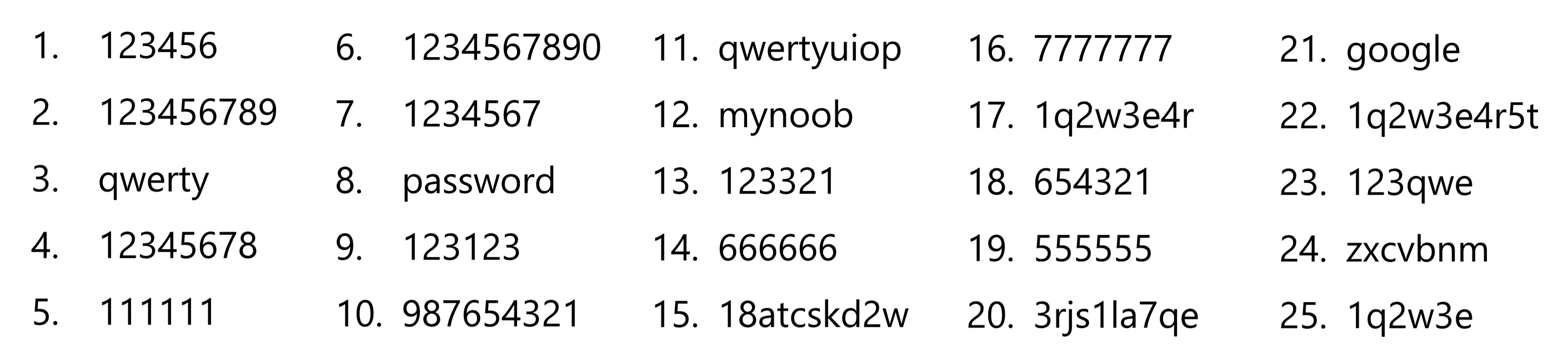
Password management company Keeper Security released a list of the most common passwords of 2017 and the most common password, making up nearly 17% of the 10 million passwords the company analyzed, was “123456.”

See their reported top 25 passwords below:

PASSWORDS - 2017 WORST COMBINATIONS

KEEPING YOUR PASSWORDS SAFE

After you determine your password for various platforms, avoid writing them down at all costs.  This includes creating an Excel spreadsheet or an office document for your team to share.

Instead, start using a password manager, such as LastPass. It will remember all of your passwords and store them in a secure way. This way, you’ll only have to remember one master password, the one for your main LastPass account.

In addition, avoid using the “REMEMBER PASSWORD” option on websites. With the convenience of being remembered by your favorite platforms comes the ability for crooks to effortlessly cruise right into your cyber world.

When it comes to creating your passwords, consider these best practices:

Adopt the 8 + 4 Rule

This rule helps you to build passwords that are strong as steel. Use eight characters with one upper and one lower case, a special character like as asterisk and a number. The more random the better.

Keep Symbols/Numbers Separate

Here’s another hint for an effective password policy to foil hackers. Make sure the numbers and symbols are spread out through the password. Bunching them up makes the password easier to hack.

Don’t Make it Personal

Everyone involved in a small business needs to understand there’s a big difference between security and convenience when it comes to passwords. It needs to be clear using personal information like your first name and birth date is a recipe for disaster. If a hacker ever gets his hands on company HR data, this information will be the first set of combinations he tries.

Avoid Dictionary Words

It might sound safe to go to the dictionary for a password, but hackers actually have programs that search through tens of thousands of these words.  Dictionary attack programs have been around for years.

Keep the Character Limit Down

The average person can only remember 10 characters or less. Long passwords run the risk of being written down so they can be remembered.

Adopt Passphrases

Abbreviations are usually immune to dictionary attacks. So TSWCOT for The Sun will Come Out Tomorrow is a good choice for a secure password. Remember to add symbols and numbers.

Stay Away from Acronyms

Don’t use these as a shortcut to identifying your department or who you are. It might be temping for an accountant to use CPA. However, that opens a cybersecurity door wide enough for a hacker to walk right through.

Don’t become a statistic this year and help keep your employees safe as well.

HOW TO OBSERVE

Celebrate World Password Day by visiting PasswordDay.org and taking the World Password Day pledge, sharing a password tip on social media, changing an old password to a long, strong one or by turning on two-factor authentication for your important accounts.

HISTORY

Security researcher Mark Burnett first encouraged people to have a “password day,” where they update important passwords in his 2005 book Perfect Passwords.  Inspired by his idea, Intel Security took the initiative to declare the first Thursday in May World Password Day in May 2013.  Submitted by Big Monocle in 2016, Password Day is meant to create awareness of the need for good password security.

———————————————————————————–

ABOUT BIG MONOCLE

Founded in 2012, Big Monocle designs creative branding and marketing that tells impactful stories. Their growing, energetic team of talented professionals focus on developing experiences and connecting with every client.


What Does Facebook Know About You? …you’ll be surprised.

You’ve probably heard by now that over 50 million Facebook users’ private information had been stolen by Cambridge Analytica during the 2016 presidential campaign. Here’s a summary of the story:

  • Data firm Cambridge Analytica accessed data from 50 million Facebook users during the 2016 US presidential campaign without the users’ permission.
  • Facebook suspended the firm from its platform on March 22, 2018, saying Cambridge Analytica lied about deleting the unauthorized information when it was first caught in 2015.
  • President Donald Trump’s campaign hired Cambridge to target voters and direct its political advertising strategy.

Since the exposure of this story, users around the world have been anxious to learn what information a data beast like Cambridge Analytica could have accessed after accessing the social platform giant.

I’m here to report that Facebook has an incredible memory and downloading my own Facebook data was not only a walk down memory lane but also terrifying. I have been a member of the site since 2007 and was presented with an insane amount of personal details that have been collected on my behalf over the last 11 years.

As you can see, it not only leaves space for contact information but my family is detailed along with an extensive work history to which is actually saved “privately” on my profile.  Apparently “private” only meant that third parties and hackers could see it, not the general public.

In addition, phone numbers and email addresses of over 20,000 people I had come across in my 10 years of sales and recruiting had been stored, many of which belong to people not even on Facebook. This was all listed under the “Contact Info” and obviously scraped from my mobile devices.

Under the “Friends” tab, I was able to see a running tab of who I had connected with over the years, when I connected and when I disconnected as well! With an account constantly flexing around 5,000 friends, the list in its totality under this tab included over 7,400 people.

The “Messages” tab was also surprising. If “de-friending” someone wasn’t enough to remove them from my data archive “Friends” tab, it certainly wasn’t enough to remove the messages either. Every conversation that I had encountered over the last 11 years from friends, strangers, exes and otherwise all reappeared and were obviously accessible to third parties and hackers.

But still, it gets crazier!!

When it came to the companies targeting me based on my preferences under the “Ads” tab, I was really surprised to find so many brands that I had never directly reached out to. After a little online research, I found this article by the Washington Post that outlines 98 touch points Facebook uses to connect us to their paid advertisers. It’s important to note as well, one of my male colleagues had a few surprising advertisers collecting his data: Rod Stewart, Sally Beauty and Cyndi Lauper. (He said he’s not a fan of any of those brands.)

There were over 1000 companies in this list for me.

But Facebook doesn’t consider this exposure a hack or even a “data breach”.  They will go as far as accepting that this was a “breach of trust” but that’s where their ownership stops.

Deputy general counsel Paul Grewal released a statement on Saturday writing that “the claim that this is a data breach is completely false” because the researcher got consent from everyone involved. Andrew “Boz” Bosworth, Facebook’s former vice president of ads, took a similar stance.

So many of us are left asking, “Is it time to delete our Facebook accounts?”.  Some brands went noticeably offline this weekend, deleting their Facebook pages, even igniting a #deletefacebook movement,  but is it necessary?

Not really.  There are plenty of ways we can start protecting our privacy more than ever.  Check out this article for some easy “Spring-Cleaning” tips to a safer online experience.

If you would like to download your own data, (and I think you should) follow the simple steps offered in your Facebook Privacy Settings:


Everyday Habits that Leave You Vulnerable Online

What Does Facebook Know About You? …you’ll be surprised.

You’ve probably heard by now that over 50 million Facebook users’ private information had been stolen by Cambridge Analytica during the 2016 presidential campaign. Here’s a summary of the story:

  • Data firm Cambridge Analytica accessed data from 50 million Facebook users during the 2016 US presidential campaign without the users’ permission.
  • Facebook suspended the firm from its platform on March 22, 2018, saying Cambridge Analytica lied about deleting the unauthorized information when it was first caught in 2015.
  • President Donald Trump’s campaign hired Cambridge to target voters and direct its political advertising strategy.

Since the exposure of this story, users around the world have been anxious to learn what information a data beast like Cambridge Analytica could have accessed after accessing the social platform giant.

I’m here to report that Facebook has an incredible memory and downloading my own Facebook data was not only a walk down memory lane but also terrifying. I have been a member of the site since 2007 and was presented with an insane amount of personal details that have been collected on my behalf over the last 11 years.

As you can see, it not only leaves space for contact information but my family is detailed along with an extensive work history to which is actually saved “privately” on my profile.  Apparently “private” only meant that third parties and hackers could see it, not the general public.

In addition, phone numbers and email addresses of over 20,000 people I had come across in my 10 years of sales and recruiting had been stored, many of which belong to people not even on Facebook. This was all listed under the “Contact Info” and obviously scraped from my mobile devices.

Under the “Friends” tab, I was able to see a running tab of who I had connected with over the years, when I connected and when I disconnected as well! With an account constantly flexing around 5,000 friends, the list in its totality under this tab included over 7,400 people.

The “Messages” tab was also surprising. If “de-friending” someone wasn’t enough to remove them from my data archive “Friends” tab, it certainly wasn’t enough to remove the messages either. Every conversation that I had encountered over the last 11 years from friends, strangers, exes and otherwise all reappeared and were obviously accessible to third parties and hackers.

But still, it gets crazier!!

When it came to the companies targeting me based on my preferences under the “Ads” tab, I was really surprised to find so many brands that I had never directly reached out to. After a little online research, I found this article by the Washington Post that outlines 98 touch points Facebook uses to connect us to their paid advertisers. It’s important to note as well, one of my male colleagues had a few surprising advertisers collecting his data: Rod Stewart, Sally Beauty and Cyndi Lauper. (He said he’s not a fan of any of those brands.)

There were over 1000 companies in this list for me.

But Facebook doesn’t consider this exposure a hack or even a “data breach”.  They will go as far as accepting that this was a “breach of trust” but that’s where their ownership stops.

Deputy general counsel Paul Grewal released a statement on Saturday writing that “the claim that this is a data breach is completely false” because the researcher got consent from everyone involved. Andrew “Boz” Bosworth, Facebook’s former vice president of ads, took a similar stance.

So many of us are left asking, “Is it time to delete our Facebook accounts?”.  Some brands went noticeably offline this weekend, deleting their Facebook pages, even igniting a #deletefacebook movement,  but is it necessary?

Not really.  There are plenty of ways we can start protecting our privacy more than ever.  Check out this article for some easy “Spring-Cleaning” tips to a safer online experience.

If you would like to download your own data, (and I think you should) follow the simple steps offered in your Facebook Privacy Settings:


Everyday Habits that Leave You Vulnerable Online

Beyond Blue – How to Deal with Stress at Work

Are you trying to figure out how to deal with stress at work? Then trust me, you’re not alone! Thousands of Americans are affected by work related stress on a daily basis, and a constant barrage of this stress could cause severe instability in your life.

Yes of course, many people like to say that “it’s just stress” and you should just let it pass by. But how long are you going to wait before realizing that this waiting game is never ending?

The University of Maryland Medical Center (UMMC) has stated, “If stress becomes persistent and low-level, however, all parts of the body’s stress apparatus (the brain, heart, lungs, blood vessels, and muscles) become chronically over-activated or under-activated. Such chronic stress may produce physical or psychological damage over time.”

This simply means that stress over time is not going to get better, and will actually only get worse unless you take action for dealing with stress at work.

There are many different ways deal with work stress. The first step? You have to admit to yourself that the stress is becoming a burden. Once you’ve convinced yourself.. go ahead and try out some of the stress relieving techniques below –

Coping with Stress at Work Through Exercising

Learn how to deal with stress at work with basic gymnastics

Start your day with a couple of basic moves to relax your body.

Exercise and stretching techniques go well together when it comes to dealing with stress at work. These two techniques are great for you to use outside of work and even during your breaks.

This doesn’t mean you need to go out and get an expensive gym membership, nor is there the need for extra finances being spent on equipment either because you can do these exercises with your own body weight.

Body weight training is simple and effective. Two great exercises to perform are push-ups and squats. Both of these exercises help release hormones in your body that suppress stress related mental blocks, and they are great for getting your body in better shape!

Push-ups exercise your entire upper body from your shoulders down to your stomach, and then squats tighten up your legs and midsection. Beat stress and look sexy? Hell yes!

Kick Start your Day!

So how do you go about actually doing these exercises? A great idea is to make the most of the morning hours. When you wake up and start to dread about the work day – take a deep breath, smile you yourself and then all you have to do is:

[alert color=green align=center]

  • Perform 20 push-ups.
  • Stand up, and then bend over to touch your toes for 20 seconds.
  • Next, hold your arms out straight in front of you and begin performing 30 squats[/alert]


These three basic techniques are going to get your body warmed up and refreshed for the challenges of your work day that are still to come! Be sure to eat a decent breakfast to give your body further energy that lasts throughout the day.

Stretch that Stress Away

Stretching techniques have been used for centuries by various cultures to ease the body and mind of physical and mental stress. Stretching could simply be rolling your head from left to right in order to relieve the tension in your brain cavities due to headaches caused by stress, or it could be more advanced techniques such as yoga!

Physiologically, yoga relaxes the body and mind. Yoga combines breathing and stretching techniques into an advanced, fluid motion of moving from one motion to another. You don’t need a class to perform the basics. Simply look up a few stretches and do them at home or at work.

Breathe In…Breathe Out…

deep breaths can help to deal with stress

Take a couple of minutes to breath. Go outside if you can.

Take a moment away from your busy schedule; take in a deep breath, and then exhale. Have you noticed that by doing so your body just naturally feels more relaxed and ready to take on the remaining work tasks? This is because every time you take in a slow, deep breath you send a chemical message to your brain. This message is to alert your brain that something is wrong, and then the brain takes the message and sends it via your nervous system to the rest of your body, which causes the relaxing feeling to occur.

The best part about using breathing techniques when it comes to coping with stress at work is that it’s free! No need for equipment and you can perform it anywhere you want, and to deal with any stressful situation at work. “Those things that happen when you are stressed, such as increased heart rate, fast breathing, and high blood pressure, all decrease as you breathe deeply to relax.”^

How To Deal With Stress At Work With Vitamins

Make sure B-vitamins are a good part of your daily nutrition. You will find it very helpful when it comes to dealing with stress at work. Dr Manny Alvarez has stated that, “B vitamins are known to promote proper functioning of the brain and nervous system, as well as help induce relaxation and fight fatigue.” All you have to do is make sure that you eat foods that are high in B-vitamins such as nuts and eggs – preferably in the morning when your body has just been fasted while you were asleep.

Tired of Feeling Like You Want To Rip Your Hair Out?

Dealing with stress at work just becomes cumbersome and tiring, and you understandably just want to start pulling your hair out. But hey, take a deep breath… and before you go crazy trying to figure out how to deal with stress at work – take an active approach. The methods shown above will help you get lead a better quality life with much less stress. Work is always going to be there so long as you have bills to pay, and a stomach to feed but stress doesn’t have to come with the package.

Taking an inactive approach only leads to depression, anxiety, and body fatigue, which only gets worse every day that passes on. Money is never an issue because most things you can do to prevent work related stress is free! So what do you think? Are you ready to change your life for the better?

Also learn how to deal with stress at work during pregnancy.

Do you have any tips on how to deal with stress and pressure at work? Do share – I’d love to know your thoughts.


^Murray MT, Pizzorno JE Jr (2006). Stress management. In JE Pizzorno Jr, MT Murray, eds., Textbook of Natural Medicine, 3rd ed., vol. 1, pp. 701–708. St. Louis: Churchill Livingstone.


3 Easy Ways to Balance Your Work and Life

Beyond Blue – How to Deal with Stress at Work

Are you trying to figure out how to deal with stress at work? Then trust me, you’re not alone! Thousands of Americans are affected by work related stress on a daily basis, and a constant barrage of this stress could cause severe instability in your life.

Yes of course, many people like to say that “it’s just stress” and you should just let it pass by. But how long are you going to wait before realizing that this waiting game is never ending?

The University of Maryland Medical Center (UMMC) has stated, “If stress becomes persistent and low-level, however, all parts of the body’s stress apparatus (the brain, heart, lungs, blood vessels, and muscles) become chronically over-activated or under-activated. Such chronic stress may produce physical or psychological damage over time.”

This simply means that stress over time is not going to get better, and will actually only get worse unless you take action for dealing with stress at work.

There are many different ways deal with work stress. The first step? You have to admit to yourself that the stress is becoming a burden. Once you’ve convinced yourself.. go ahead and try out some of the stress relieving techniques below –

Coping with Stress at Work Through Exercising

Learn how to deal with stress at work with basic gymnastics

Start your day with a couple of basic moves to relax your body.

Exercise and stretching techniques go well together when it comes to dealing with stress at work. These two techniques are great for you to use outside of work and even during your breaks.

This doesn’t mean you need to go out and get an expensive gym membership, nor is there the need for extra finances being spent on equipment either because you can do these exercises with your own body weight.

Body weight training is simple and effective. Two great exercises to perform are push-ups and squats. Both of these exercises help release hormones in your body that suppress stress related mental blocks, and they are great for getting your body in better shape!

Push-ups exercise your entire upper body from your shoulders down to your stomach, and then squats tighten up your legs and midsection. Beat stress and look sexy? Hell yes!

Kick Start your Day!

So how do you go about actually doing these exercises? A great idea is to make the most of the morning hours. When you wake up and start to dread about the work day – take a deep breath, smile you yourself and then all you have to do is:

[alert color=green align=center]

  • Perform 20 push-ups.
  • Stand up, and then bend over to touch your toes for 20 seconds.
  • Next, hold your arms out straight in front of you and begin performing 30 squats[/alert]


These three basic techniques are going to get your body warmed up and refreshed for the challenges of your work day that are still to come! Be sure to eat a decent breakfast to give your body further energy that lasts throughout the day.

Stretch that Stress Away

Stretching techniques have been used for centuries by various cultures to ease the body and mind of physical and mental stress. Stretching could simply be rolling your head from left to right in order to relieve the tension in your brain cavities due to headaches caused by stress, or it could be more advanced techniques such as yoga!

Physiologically, yoga relaxes the body and mind. Yoga combines breathing and stretching techniques into an advanced, fluid motion of moving from one motion to another. You don’t need a class to perform the basics. Simply look up a few stretches and do them at home or at work.

Breathe In…Breathe Out…

deep breaths can help to deal with stress

Take a couple of minutes to breath. Go outside if you can.

Take a moment away from your busy schedule; take in a deep breath, and then exhale. Have you noticed that by doing so your body just naturally feels more relaxed and ready to take on the remaining work tasks? This is because every time you take in a slow, deep breath you send a chemical message to your brain. This message is to alert your brain that something is wrong, and then the brain takes the message and sends it via your nervous system to the rest of your body, which causes the relaxing feeling to occur.

The best part about using breathing techniques when it comes to coping with stress at work is that it’s free! No need for equipment and you can perform it anywhere you want, and to deal with any stressful situation at work. “Those things that happen when you are stressed, such as increased heart rate, fast breathing, and high blood pressure, all decrease as you breathe deeply to relax.”^

How To Deal With Stress At Work With Vitamins

Make sure B-vitamins are a good part of your daily nutrition. You will find it very helpful when it comes to dealing with stress at work. Dr Manny Alvarez has stated that, “B vitamins are known to promote proper functioning of the brain and nervous system, as well as help induce relaxation and fight fatigue.” All you have to do is make sure that you eat foods that are high in B-vitamins such as nuts and eggs – preferably in the morning when your body has just been fasted while you were asleep.

Tired of Feeling Like You Want To Rip Your Hair Out?

Dealing with stress at work just becomes cumbersome and tiring, and you understandably just want to start pulling your hair out. But hey, take a deep breath… and before you go crazy trying to figure out how to deal with stress at work – take an active approach. The methods shown above will help you get lead a better quality life with much less stress. Work is always going to be there so long as you have bills to pay, and a stomach to feed but stress doesn’t have to come with the package.

Taking an inactive approach only leads to depression, anxiety, and body fatigue, which only gets worse every day that passes on. Money is never an issue because most things you can do to prevent work related stress is free! So what do you think? Are you ready to change your life for the better?

Also learn how to deal with stress at work during pregnancy.

Do you have any tips on how to deal with stress and pressure at work? Do share – I’d love to know your thoughts.


^Murray MT, Pizzorno JE Jr (2006). Stress management. In JE Pizzorno Jr, MT Murray, eds., Textbook of Natural Medicine, 3rd ed., vol. 1, pp. 701–708. St. Louis: Churchill Livingstone.


3 Easy Ways to Balance Your Work and Life